Build an AI Discord bot with WebSocket triggers
This guide walks you through building a Discord bot that connects to the Discord Gateway via Windmill's WebSocket trigger, uses the application-level heartbeat feature to maintain the connection, and responds to messages using the Claude Agent SDK with tool use.
Everything runs inside Windmill — the AI agent can only call the tools you explicitly define, and secrets are managed via resources (never exposed to the AI).
Overview
The architecture is simple:
- A WebSocket trigger connects to Discord's Gateway (
wss://gateway.discord.gg) - The heartbeat config keeps the connection alive by sending periodic heartbeat messages (required by Discord's protocol)
- A handler script processes incoming events — authenticates the bot, and runs a Claude agent with tools
- The agent decides which tools to call based on the message, and responses are sent back via the Discord REST API
Prerequisites
- A Windmill instance (self-hosted with EE, WebSocket triggers are not available on Cloud Free/Team plans)
- A Discord bot token (create one in the Discord Developer Portal)
- An Anthropic API key for Claude
- The
@anthropic-ai/claude-agent-sdkpackage (available on npm)
Step 1: Create a Discord bot
- Go to the Discord Developer Portal
- Click New Application, give it a name, and create it
- Go to the Bot tab:
- Click Reset Token and copy the token — save it, you'll only see it once
- Under Privileged Gateway Intents, enable Message Content Intent
- Go to the OAuth2 tab:
- Under OAuth2 URL Generator, select the
botscope - Under Bot Permissions, select: Send Messages, Read Message History, View Channels
- Copy the generated URL and open it in your browser to invite the bot to your server
- Under OAuth2 URL Generator, select the
Step 2: Create Windmill resources
Create two resources in your Windmill workspace:
Discord bot token (e.g., f/bot/discord_token):
{
  "token": "YOUR_DISCORD_BOT_TOKEN"
}
Anthropic API key (e.g., f/bot/anthropic, resource type anthropic):
{
  "apiKey": "YOUR_ANTHROPIC_API_KEY"
}
Step 3: Create the handler script
Create a new Bun/TypeScript script (e.g., f/bot/discord_handler). This script handles all Discord Gateway events and runs a Claude agent with tools when a message is received:
import { query, tool, createSdkMcpServer } from "@anthropic-ai/claude-agent-sdk";
import * as wmill from "windmill-client";
import { z } from "zod";

// Restrict to a specific channel (optional — remove for all channels)
const ALLOWED_CHANNEL = "YOUR_CHANNEL_ID";

// Your bot's application ID (same as the user ID for bots)
const BOT_USER_ID = "YOUR_BOT_APPLICATION_ID";

// Optional: allow DMs from a specific user (your Discord user ID)
const ALLOWED_DM_USER = "YOUR_DISCORD_USER_ID";

// Define tools the AI agent can use via an in-process MCP server
const toolServer = createSdkMcpServer({
  name: "bot-tools",
  tools: [
    tool(
      "get_current_time",
      "Get the current date and time",
      {},
      async () => ({
        content: [{ type: "text", text: new Date().toISOString() }],
      })
    ),
    // Add your own tools here — e.g. query a database, check an API, etc.
    // The AI agent can only call the tools defined here.
    // Secrets are fetched inside the tool implementation via wmill.getResource(),
    // so the AI never sees raw API keys or credentials.
  ],
});

export async function main(msg: string): Promise<string | null> {
  let event: any;
  try {
    event = JSON.parse(msg);
  } catch {
    return null;
  }

  const op = event.op;

  // Op 10: Hello — respond with Identify to authenticate
  if (op === 10) {
    console.log(`Hello received. heartbeat_interval: ${event.d?.heartbeat_interval}ms`);
    const token = (await wmill.getResource("f/bot/discord_token")).token;
    return JSON.stringify({
      op: 2,
      d: {
        token,
        intents: 37377, // GUILDS + GUILD_MESSAGES + MESSAGE_CONTENT + DIRECT_MESSAGES
        properties: { os: "linux", browser: "windmill", device: "windmill" }
      }
    });
  }

  // Op 11: Heartbeat ACK — ignore (heartbeat is handled by the trigger)
  if (op === 11) return null;

  // Op 0: Dispatch events
  if (op === 0) {
    const t = event.t;

    if (t === "READY") {
      console.log(`Connected as ${event.d?.user?.username}`);
      return null;
    }

    if (t === "MESSAGE_CREATE") {
      const d = event.d;

      // Ignore bot messages
      if (d.author?.bot) return null;

      // Handle DMs and channel messages differently
      const isDM = !d.guild_id;
      if (isDM) {
        // Only accept DMs from the allowed user (remove this check to accept all DMs)
        if (d.author?.id !== ALLOWED_DM_USER) return null;
      } else {
        // In channels: only respond in the allowed channel and when @mentioned
        if (d.channel_id !== ALLOWED_CHANNEL) return null;
        const mentioned = d.mentions?.some((m: any) => m.id === BOT_USER_ID);
        if (!mentioned) return null;
      }

      const channelId = d.channel_id;
      const content = d.content
        .replace(new RegExp(`<@!?${BOT_USER_ID}>`, "g"), "")
        .trim();
      const username = d.author?.username;

      console.log(`[#${channelId}] ${username}: ${content}`);

      // Set up Anthropic API key for the agent SDK
      const anthropicRes = await wmill.getResource("f/bot/anthropic");
      process.env.ANTHROPIC_API_KEY = anthropicRes.apiKey;

      // Run the Claude agent with tools
      let response = "";
      for await (const agentMsg of query({
        prompt: `${username} says: ${content}\n\nRespond concisely in Discord style. Use your tools when relevant.`,
        options: {
          model: "sonnet",
          pathToClaudeCodeExecutable: "/usr/bin/claude",
          permissionMode: "bypassPermissions",
          allowDangerouslySkipPermissions: true,
          mcpServers: { tools: toolServer },
        },
      })) {
        if (agentMsg.type === "assistant") {
          const text = agentMsg.message.content
            .filter((b: any) => b.type === "text")
            .map((b: any) => b.text)
            .join("");
          if (text) response = text;
        }
      }

      if (!response.trim()) return null;

      // Send reply via Discord REST API (split long messages)
      const token = (await wmill.getResource("f/bot/discord_token")).token;
      const chunks = splitMessage(response.trim(), 2000);
      for (const chunk of chunks) {
        const resp = await fetch(
          `https://discord.com/api/v10/channels/${channelId}/messages`,
          {
            method: "POST",
            headers: {
              "Content-Type": "application/json",
              Authorization: `Bot ${token}`,
            },
            body: JSON.stringify({ content: chunk }),
          }
        );
        if (!resp.ok) {
          console.log(`Discord send failed: ${resp.status} ${await resp.text()}`);
          break;
        }
      }

      console.log(`Replied (${response.length} chars): ${response.slice(0, 100)}`);
    }
  }

  return null;
}

function splitMessage(text: string, maxLen: number): string[] {
  if (text.length <= maxLen) return [text];
  const chunks: string[] = [];
  let remaining = text;
  while (remaining.length > 0) {
    if (remaining.length <= maxLen) {
      chunks.push(remaining);
      break;
    }
    let splitAt = remaining.lastIndexOf("\n", maxLen);
    if (splitAt < maxLen / 2) splitAt = maxLen;
    chunks.push(remaining.slice(0, splitAt));
    remaining = remaining.slice(splitAt).trimStart();
  }
  return chunks;
}
Key points:
- Op 10 (Hello): When Discord sends the Hello event, the script returns an Identify payload to authenticate the bot. This is sent back through the WebSocket because "Send runnable result" is enabled.
- Op 11 (Heartbeat ACK): Ignored — the heartbeat itself is handled by the trigger's heartbeat configuration, not the script.
- MESSAGE_CREATE: The script filters for messages in the allowed channel (or DMs from an allowed user), then runs a Claude agent with access to the tools you define. The agent decides which tools to call based on the user's message.
- Tool use: Tools are defined via
createSdkMcpServerfrom the Claude Agent SDK. The AI can only call tools you explicitly register — it has no access to environment variables, the filesystem, or arbitrary network calls. Secrets are fetched inside tool implementations viawmill.getResource(), so the AI never sees raw credentials. - Message splitting: Discord has a 2000-character limit per message, so long responses are split at newline boundaries.
Step 4: Create the WebSocket trigger
Create a new WebSocket trigger with the following configuration:
| Setting | Value |
|---|---|
| URL | wss://gateway.discord.gg/?v=10&encoding=json |
| Script | f/bot/discord_handler |
| Send runnable result | Enabled |
| Initial messages | (none) |
Heartbeat configuration
This is the key part. Discord's Gateway requires clients to send a periodic heartbeat message containing the last received sequence number. Without it, Discord closes the connection after ~41 seconds.
| Setting | Value |
|---|---|
| Enable heartbeat | Yes |
| Interval (seconds) | 41 |
| Message | {"op": 1, "d": {{state}}} |
| State field | s |
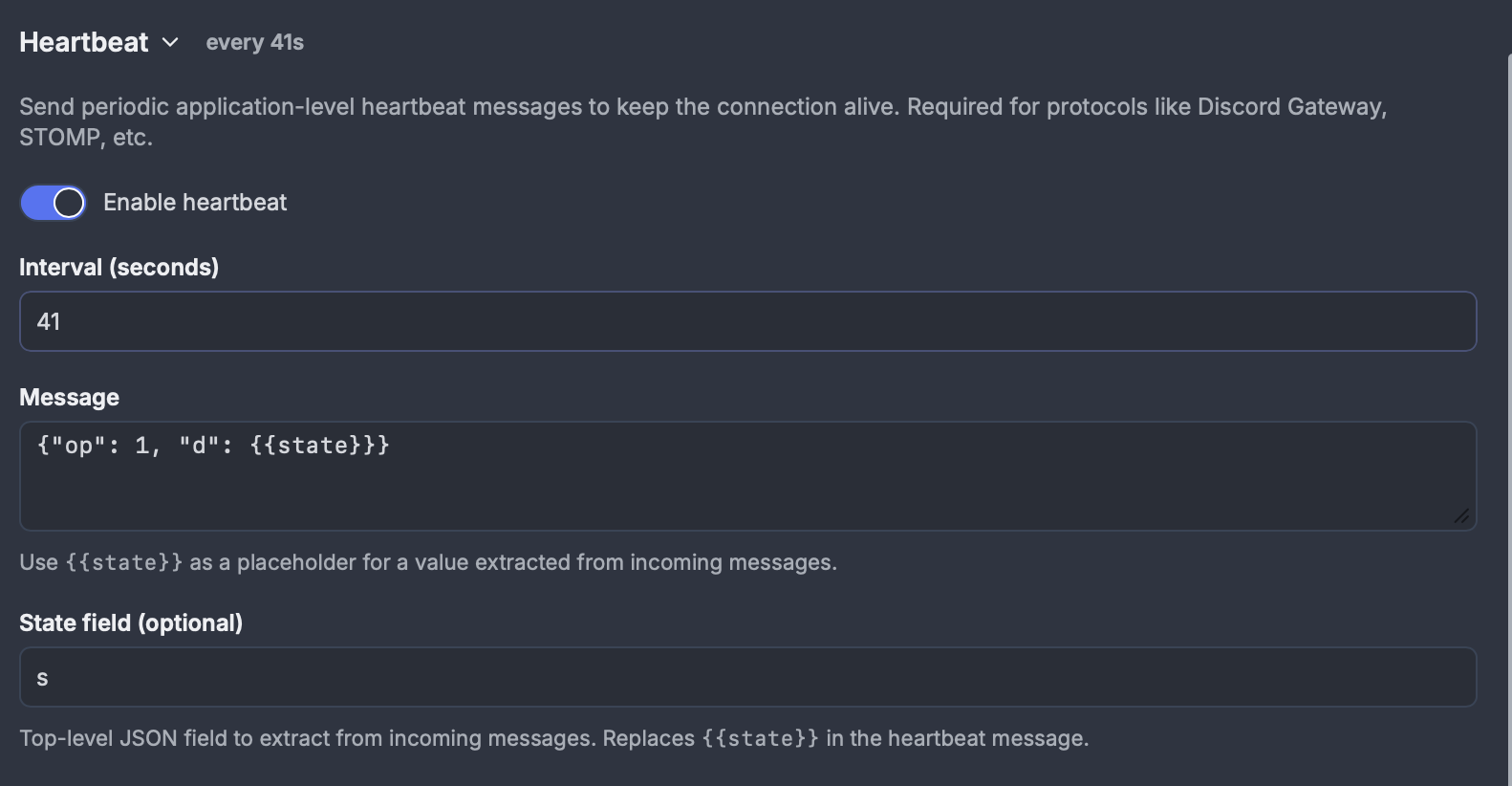
This tells Windmill to:
- Extract the
s(sequence number) field from every incoming Discord message - Every 41 seconds, send
{"op": 1, "d": <last_sequence>}through the WebSocket
The heartbeat runs at the Rust level with zero job overhead.
Discord requires the client to receive a Hello (op 10) event before sending Identify (op 2). Since initial messages are sent immediately on connection (before any messages are read), sending Identify as an initial message would fail. Instead, the handler script detects the Hello event and returns the Identify payload via the "Send runnable result" feature.
Step 5: Test it
- Save and enable the trigger
- Check the trigger status — it should show no errors and an active server ID
- Send a message in your Discord channel (@ the bot if you added the mention filter)
- The bot should respond with a Claude-generated reply
You can verify the heartbeat is working by checking completed jobs — you should see handler jobs with empty results at ~41-second intervals (these are the Heartbeat ACK events from Discord).
Discord Gateway intents
The Identify payload uses intents: 37377, which is a bitmask combining:
| Intent | Value | Purpose |
|---|---|---|
GUILDS | 1 << 0 = 1 | Receive guild/channel metadata |
GUILD_MESSAGES | 1 << 9 = 512 | Receive message events in guild channels |
DIRECT_MESSAGES | 1 << 12 = 4096 | Receive DM events |
MESSAGE_CONTENT | 1 << 15 = 32768 | Access message content (privileged — must be enabled in the Developer Portal) |
Total: 1 + 512 + 4096 + 32768 = 37377
Without MESSAGE_CONTENT, the content field in message events will be empty for messages from other users. Without DIRECT_MESSAGES, the bot won't receive DM events.
Adding AI sandbox with volumes
You can enhance the bot with persistent context by using volumes. Add a volume annotation to the script:
// volume: my-bot-volume .claude
This mounts a persistent volume at .claude/ where you can store persona files, conversation history, or learned preferences that persist across executions:
import * as fs from "fs";

// Load persona from volume
let systemPrompt = "You are a helpful assistant.";
if (fs.existsSync(".claude/PERSONA.md")) {
  systemPrompt = fs.readFileSync(".claude/PERSONA.md", "utf-8");
}
Next steps
- Add conversation history by storing recent messages in a database or volume
- Use filters on the WebSocket trigger to only trigger the handler for specific event types
- Connect multiple bots by creating additional WebSocket triggers with different tokens